
How to Create a Google Review QR Code for Your Business
Most customers who have a great experience don't leave a review — not because they don't want to, but because leaving one takes too many steps. A QR code fixes that.

QR Junction Team
Experts in QR code technology and digital solutions
Google reviews are the single most impactful thing for local business visibility. More reviews, better ratings, higher rankings in Google Maps, more customers finding you. The logic is straightforward.
The problem is the gap between a customer having a good experience and them actually leaving a review. Most people intend to do it. Almost no one follows through — because searching for your business on Google, finding the reviews section, and writing something takes effort.
A Google Review QR code collapses that entire process into one scan. The customer scans, the review form opens directly, and they type their experience. No searching. No navigating. Just the review box, immediately.
Here's how to set one up.
Step 1: Get Your Google Review Link
Before creating the QR code, you need the direct link to your Google review form. This is not just your Google Maps URL — it's a specific link that opens the review dialog directly.
Here's how to get it:
- Go to Google Maps and search for your business by name
- Click on your business listing to open it
- Scroll down and click 'Write a review'
- Copy the full URL from your browser address bar — this is your direct review link
- Alternatively, go to your Google Business Profile dashboard at business.google.com, click 'Get more reviews', and copy the link provided there — this is the cleanest version
Step 2: Create the QR Code on QRJunction
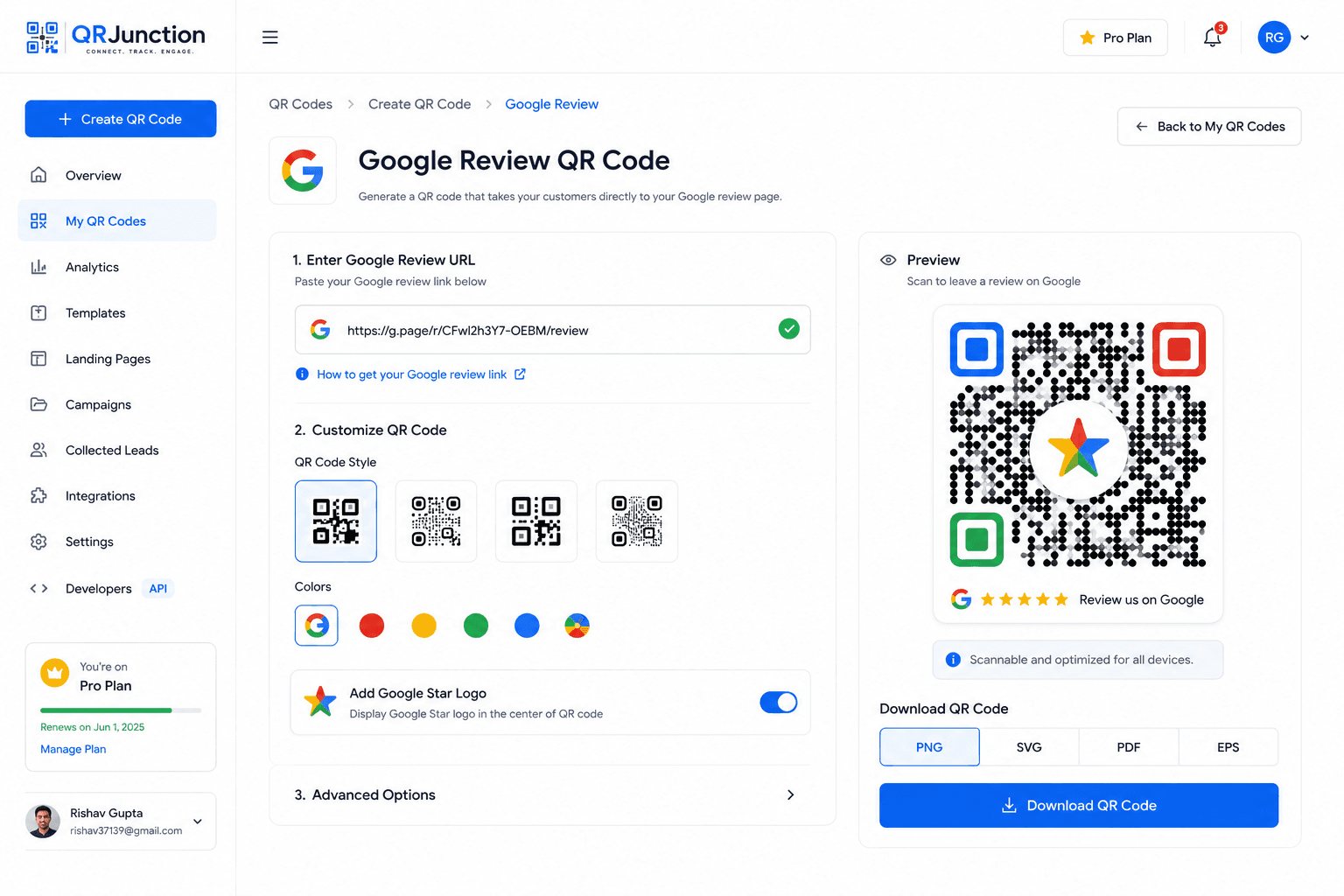
Once you have your Google review link, creating the QR code is the easy part.
- Open QRJunction.in and select the URL QR code type
- Paste your Google review direct link into the URL field
- Add a Google 'G' logo or star icon to the center of the QR code — it immediately signals to customers what the code is for
- Use a dynamic QR code so you can track scan volumes and update the link if your Google listing ever changes
- Download in high resolution — SVG for print materials, PNG for digital use
- Test the QR code before printing: scan it and confirm it opens the review form directly
Where to Place Your Google Review QR Code
The placement is more important than the QR code itself. You want to catch customers at the exact moment they feel good about their experience — while it's fresh, while they're still with you, or immediately after leaving.
- On the bill or receipt — the highest-converting placement for restaurants and retail
- At the checkout counter or payment terminal — right where the transaction closes on a positive note
- On table cards in restaurants and cafes — give customers something to do while waiting
- On the back of your business card — turn every card you hand out into a review request
- In post-purchase packaging and thank you cards — catches customers when the product has just arrived
- On your storefront window or door — visible to people walking out after a good experience
- In follow-up emails after a service — with a 'Tap here to scan' image of the QR code
What to Write Next to the QR Code
The QR code alone won't maximize your review count. The copy next to it matters significantly.
Weak: 'Leave us a review'
Better: 'Had a great experience? Scan to share it on Google — it takes 30 seconds and helps us hugely.'
The key elements: acknowledge the positive experience, set expectations on time (30 seconds feels manageable), and explain why it matters to your business. Customers who feel that their review has a real impact are far more likely to leave one.
If your business has a strong relationship with its regulars, even more personal language works: 'Your review helps other locals find us. Scan to share yours.'
Track Which Placements Are Actually Working
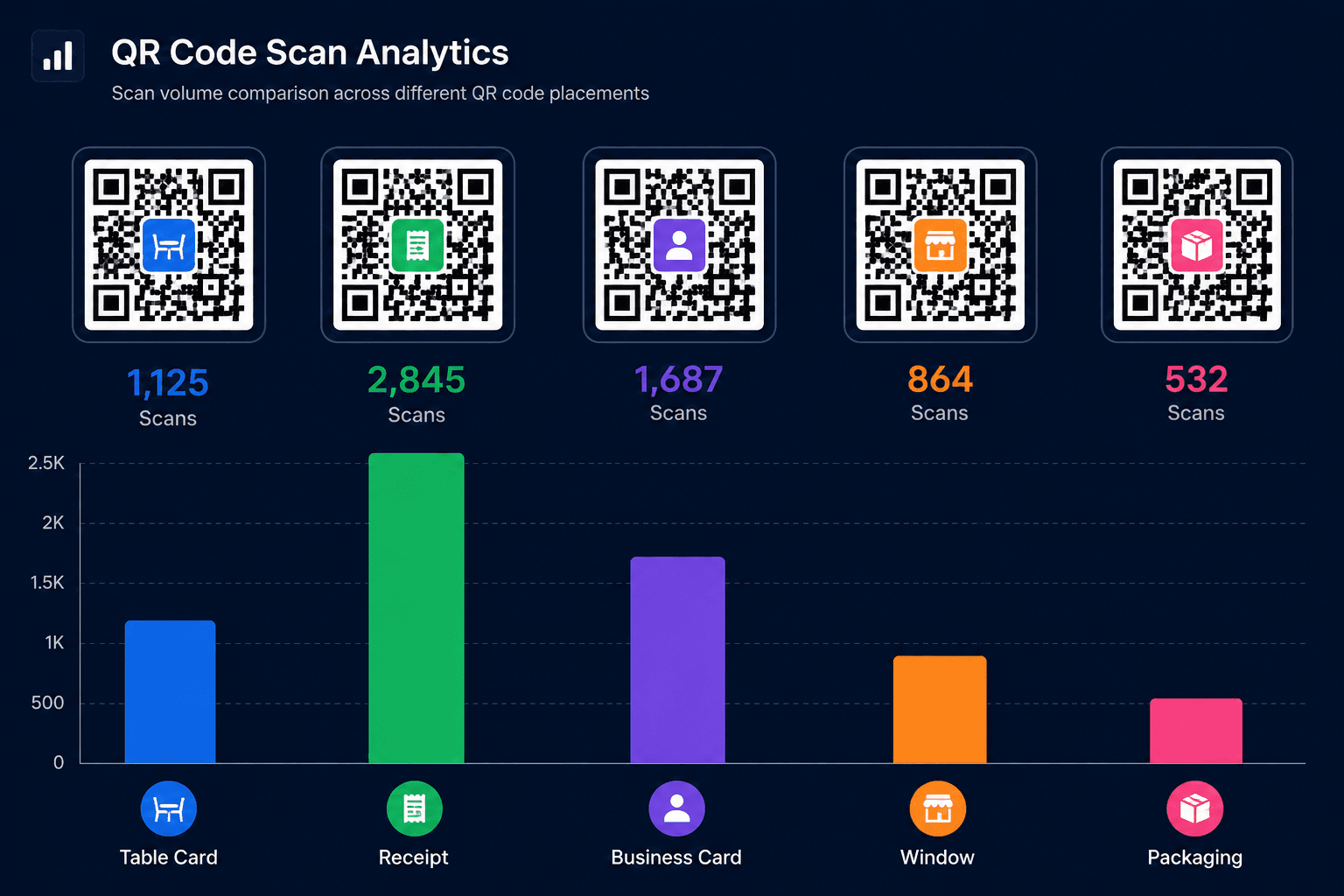
If you place your Google Review QR code in five locations — table cards, receipts, business cards, the window, and post-purchase packaging — how do you know which one is driving the most scans?
With a static QR code, you don't. You have no data.
With QRJunction's dynamic QR codes, you can create a separate QR code for each location, all pointing to the same Google review link, and track scan counts individually. This tells you exactly which placements justify the real estate and which ones you should retire.
Over time, this data compounds. You stop guessing which marketing touchpoints work and start knowing.
Reviews Don't Happen by Accident
Customers with great experiences have every intention of leaving a review. What stops them is friction — too many steps between the intention and the action.
A Google Review QR code removes that friction entirely. The review form is one scan away. At the exact moment a customer feels good about your service.
Set it up once. Put it everywhere. Track the scans. Your Google rating will reflect it.
Create Your Google Review QR Code Free
Create custom vector patterns, integrate dynamic redirection endpoints, and view details.