Modernize Your Professional Networking
Instantly share your comprehensive LinkedIn profile, digital resume, or Company Page with a simple smartphone scan at your next networking event, job fair, or conference.
Did you know?
Over 80% of B2B leads generated from social media channels originate from LinkedIn. Allowing offline contacts to connect with you instantly is crucial for career and business growth.
Loading generator engine...
How to Create a LINKEDIN QR Code
Find Your LinkedIn URL
Go to your LinkedIn profile or Company page and copy the public URL from the address bar (e.g., linkedin.com/in/yourname).
Generate Your Code
Paste the link into our generator. You can choose to generate a QR code for a Personal Profile or a Company Page.
Add Professional Branding
Customize the colors (LinkedIn Blue is always a safe bet) and add a small LinkedIn logo to the center so people know exactly what they are scanning.
Download and Share
Download your QR code and add it to your resume, business card, email signature, or presentation slides.
Business Cards vs LinkedIn QR Codes
| Feature | Paper Business Card | LinkedIn QR Code |
|---|---|---|
| Information Detail | Limited to name and number | Full resume and work history |
| Follow-up Rate | 88% of cards are thrown away | Instant digital connection |
| Cost | Expensive to print and update | 100% Free |
| Environmental Impact | High paper waste | Zero waste |
Where to use your LINKEDIN QR Code
Next-Generation Smart Resumes
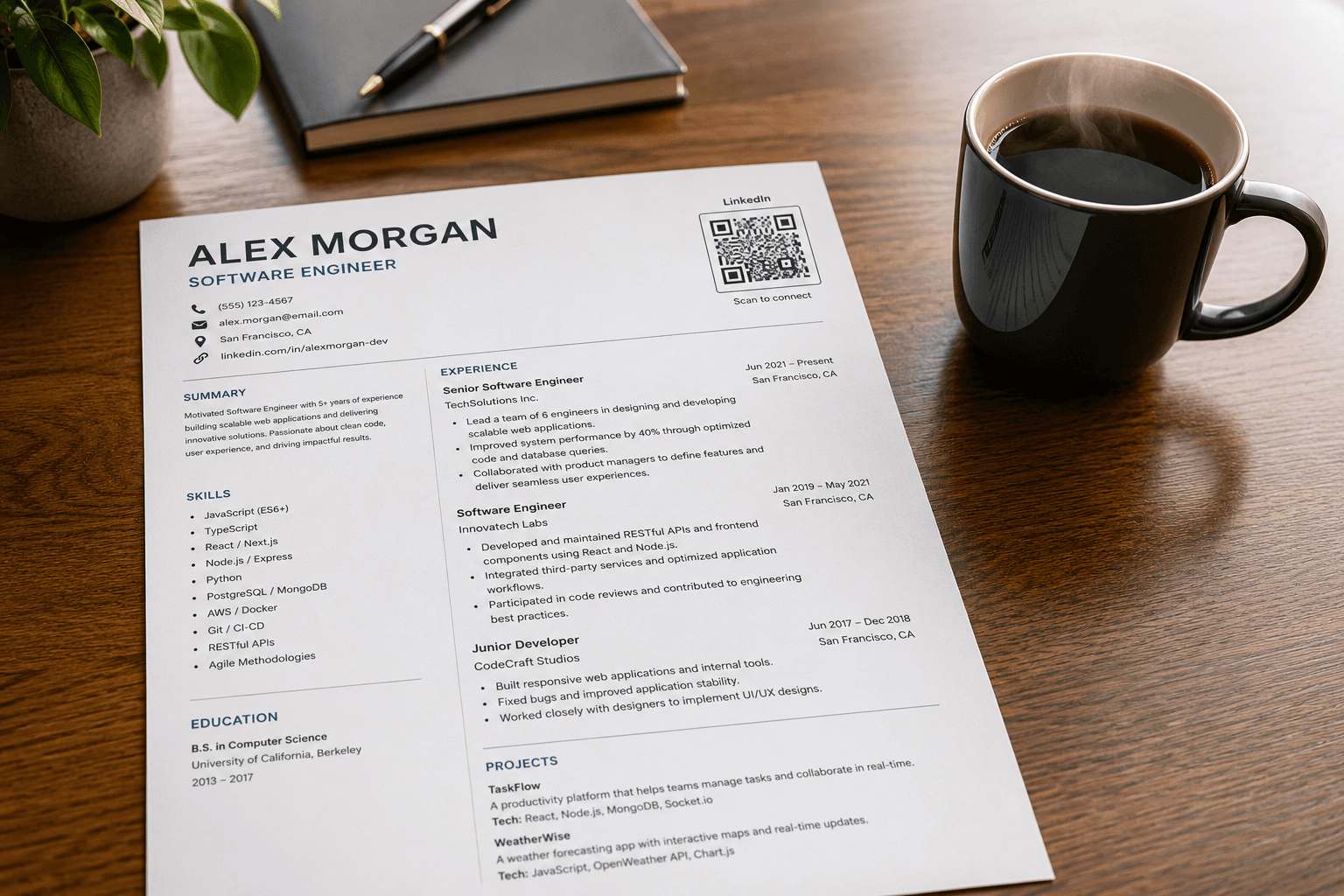
Add a professional QR code to the top of your printed CV so busy recruiters can instantly view your full work history, peer endorsements, and extensive portfolio with one tap.
High-Level Networking Events
Replace outdated traditional business cards entirely. Simply have new connections scan your unique code directly from your phone screen or smart badge to instantly connect.
Corporate Pitch Presentations
Include a massive QR code on your final "Thank You" slide to allow the entire audience to connect with you effortlessly before they even leave their seats.
Why choose this format?
Instant, Error-Free Connections
Completely eliminates frustrating name-spelling errors and ensures the person connects with your exact profile, rather than someone else sharing your common name.
Versatile Dual Support
Our engine is flexible—generate optimized codes for both individual personal profiles and corporate company pages depending on your specific marketing goal.
Sustainable & Eco-Friendly
Dramatically reduces the need for printing thousands of expensive physical business cards that ultimately end up in the trash, boosting your green credentials.
Call-to-Action Examples that Convert
Never print a QR code without a reason to scan. Try these proven CTAs.
"Scan to Connect"
Perfect for business cards and name badges.
"View Full Resume"
Excellent for printed portfolios or one-page CVs.
"Follow our Company Page"
Great for B2B brochures and trade show banners.
How to Display Your LinkedIn QR Code
Make sure your professional QR code scans flawlessly at your next big event.
Resume Placement
Place it neatly in the top right corner of your resume. Ensure it is at least 2.5 x 2.5 cm so it can be scanned easily by HR software or a mobile phone.
Presentation Slides
If placing it on a projector slide, make it large (at least 20% of the slide). Use high contrast so people sitting in the back row can scan it.
Digital Sharing
You don't always have to print! Save the image to your phone's lock screen or a dedicated photo album so you can present it quickly when networking.
Frequently Asked Questions
Everything you need to know about generating and using linkedin QR codes effectively.
Can I use this tool to link directly to my Company Page?
Yes, you can easily toggle the setting between a "Personal Profile" and a "Company Page" when generating the code to ensure the routing is handled correctly.
How do I find my exact LinkedIn username or slug?
Go to your LinkedIn profile and check the URL in your web browser. Your username is the exact text string located immediately after the "in/" or "company/" part of the link.
Will scanning this force the user to log in?
If they have the LinkedIn app installed on their phone, the OS will deep-link them directly into the app where they are already logged in. Otherwise, it will open the mobile browser.
Is a LinkedIn QR code better than a vCard QR code?
It depends on your goal. A vCard saves your phone number directly to their contacts. A LinkedIn QR code connects them to your professional network. For pure business networking, LinkedIn is often preferred.