
Turn Offline Audiences into Instagram Followers
Generate a sleek, custom-branded QR code that deep-links straight into the Instagram app. Perfect for cafes, salons, creators, and retail stores looking to grow their grid organically.
Did you know?
Scanning an Instagram QR code bypasses the clunky mobile browser and opens the native app directly. This simple step increases the chances of a user hitting "Follow" by over 60%.
Loading generator engine...
How to Create a INSTAGRAM QR Code
Enter your Instagram Handle
Simply type in your exact Instagram username (e.g., @yourbrand), or paste the full URL if you want to link to a specific Reel or Post.
Customize the Design
Match your brand's vibe. Change the pattern, pick a vibrant color gradient, and upload your brand logo to sit perfectly in the center.
Test the Code
Before downloading, take out your smartphone, open the camera app, and scan your computer screen to ensure it opens the Instagram app correctly.
Download and Print
Download as a high-quality PNG for digital flyers, or get the crisp SVG format if you plan on printing it on large banners or storefront windows.
Instagram Built-in QR vs QR Junction
| Feature | Instagram App QR | QR Junction Custom QR |
|---|---|---|
| Destinations | Only links to your main profile | Links to Profile, Posts, Reels, or Highlights |
| Design Options | Basic colors and emojis only | Full brand colors, gradients, and custom shapes |
| File Formats | Low-resolution JPEG screenshot | High-res PNG, WebP, and scalable vector SVG |
| Center Logo | Forces your profile picture | Upload any business logo or icon you want |
Where to use your INSTAGRAM QR Code
Cafe Table Tents & Menus
Place a custom QR code on your cafe tables with a CTA like "Scan to follow our Instagram for daily specials". It gives waiting customers something engaging to do and builds your local following.
Salon Mirrors & Counters
Let clients scan the mirror sticker while getting a haircut to see your latest transformations, Reels, and bridal makeup portfolios instantly.
Boutique Packaging & Tags
Add a small QR code on shopping bags or clothing tags that says "Tag us on Instagram and get featured!" to encourage user-generated content.
Why choose this format?
Native App Deep Linking
Our smart codes open directly inside the native Instagram app rather than a mobile browser. This means users are already logged in and just one tap away from engaging with your content.
Supports Posts, Reels & Highlights
Don't limit yourself to just profile links. You can generate QR codes that link directly to a viral Reel, a specific product post, or an important Story Highlight.
Complete Brand Aesthetic Control
Customize the QR code with your specific brand colors, modern gradients, and embed your own logo in the center to perfectly match your curated aesthetic.
Call-to-Action Examples that Convert
Never print a QR code without a reason to scan. Try these proven CTAs.
"Scan to Follow"
The classic approach. Best paired with an incentive: "Scan to follow our Instagram for daily specials and secret menu items."
"Scan to Watch Reel"
Perfect for product packaging. "Scan to watch how to assemble this product on our latest Instagram Reel."
"Tag Us & Get Featured"
Great for retail mirrors and shopping bags. Encourages customers to take a photo and mention your brand.
Printing Your Instagram QR Code Correctly
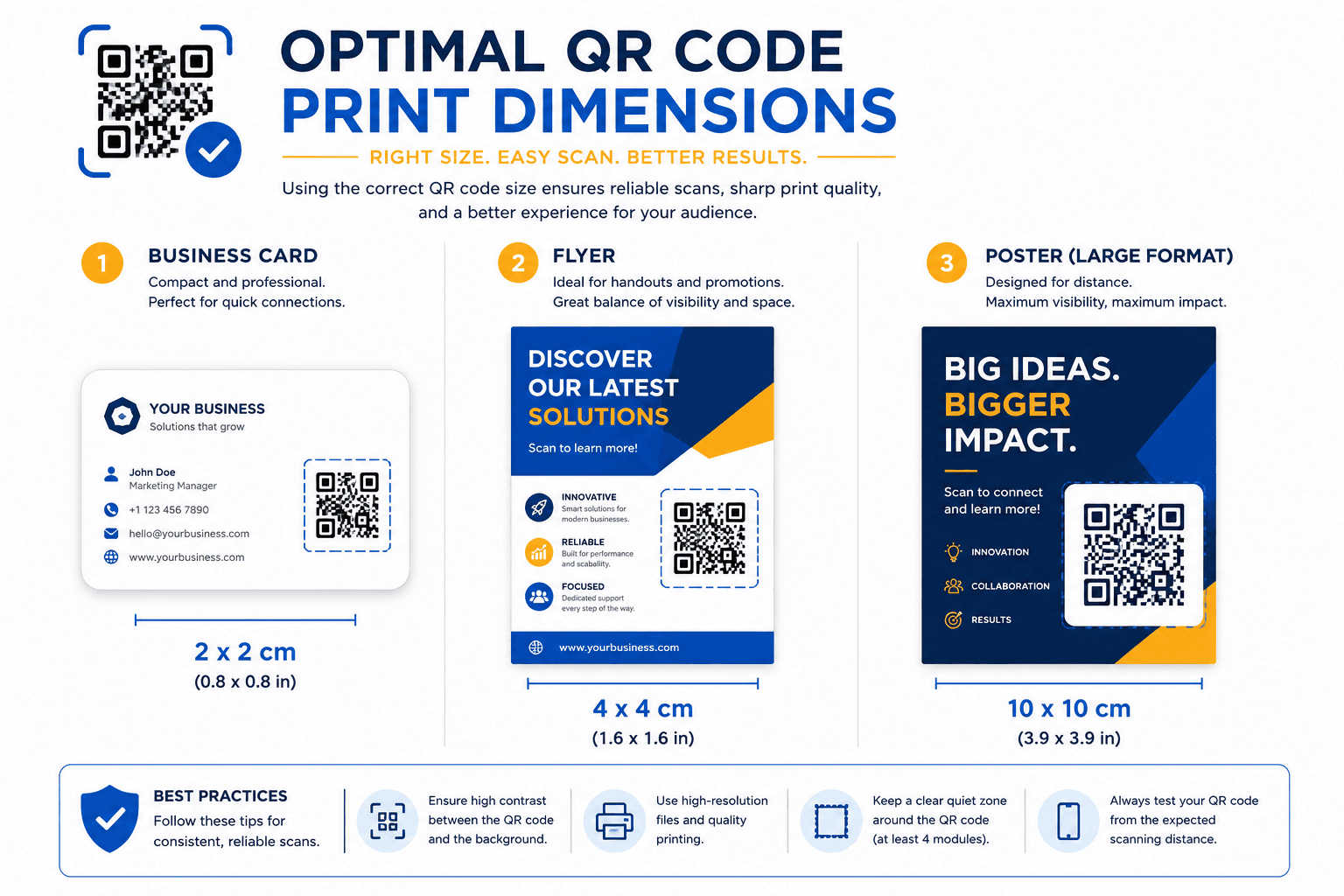
Nothing is worse than printing 1,000 flyers only to realize the QR code doesn't scan. Follow these golden rules to ensure your Instagram code scans perfectly every single time.
Minimum Size Requirements
For business cards, never print smaller than 2 x 2 cm. For flyers and table tents, aim for 3 to 5 cm. If it's going on a poster or storefront, use the 10:1 rule (size should be 1/10th of the scan distance).
Maintain the Quiet Zone
Always leave a clear, unprinted white border (called the quiet zone) around the edges of the QR code. If text or graphics touch the code, smartphones won't recognize it.
High Contrast is Mandatory
Ensure there is a strong contrast between the dark QR dots and the light background. Never use a light yellow QR code on a white background, or a dark blue code on a black background.
Use SVG for Large Prints
If you are printing on a large banner, window decal, or hoarding, always download the SVG format. Unlike PNGs, SVGs never pixelate or blur when stretched.
Frequently Asked Questions
Everything you need to know about generating and using instagram QR codes effectively.
How do I create a QR code for my Instagram profile?
Just type your exact Instagram username into our generator above. Customize the colors, add your logo, and hit download. It's completely free.
Can I make a QR code for an Instagram Reel or Post?
Absolutely! Instead of typing your username, open Instagram, copy the exact link to the Reel or Post, and paste that full URL into our generator.
Is Instagram's built-in QR code enough?
Instagram's built-in QR is fine for casual use, but it limits your design to basic emojis and only provides a low-res image. For professional printing, branding, and linking to specific Reels, a custom generator is much better.
What happens if I change my Instagram username?
If you use a static QR code (which links directly to your username URL), changing your username will break the QR code. You will need to generate and print a new one. To avoid this, use a dynamic URL QR code.
Can I track how many people scan my Instagram QR code?
Static QR codes cannot be tracked. If you need scan analytics (how many people scanned, from where, and when), you should generate a Dynamic URL QR code and paste your Instagram profile link into it.
Does an Instagram QR code expire?
Our static Instagram QR codes never expire. They will work permanently as long as your Instagram account remains active and your username stays exactly the same.