
How to Track QR Code Scans (And Stop Guessing Which Poster Worked)
If the code encodes the website itself, Google Analytics will call every scan Direct. Tracking only exists when the square hits a short link you control first.


QR Junction Team
We build QR tools that restaurants actually print and use.
A salon in Andheri ran three posters for the same offer: one in the lift, one on the glass door, one inside a Diwali flyer. At the month-end meeting someone asked which poster worked. Nobody knew. The QR on all three was the same static image from a free generator. GA4 showed a bump in Direct. That was the entire report.
QR code tracking is not a mystery feature. It is a redirect with a log. The phone hits your short link, you record device, city, time, and a visitor cookie, then you send the person to the real page. If you skip the short link, there is nothing to count except whatever the destination site happens to see — usually “Direct / none”.
This is how to track QR code scans without lying to yourself about the numbers.
Can QR codes be tracked?
Static codes cannot, not in any useful way. The destination is painted into the squares. Your server never sees the scan. The restaurant website might see a visit. It will not know it came from the window versus the visiting card.
Dynamic codes can. The square stores something like qrjunction.in/q/ab12cd. That request is yours. You can attach UTMs, change the destination later, and keep a history of scans.
People mix this up with “the QR code spies on the phone.” It does not. Tracking is the same idea as a branded short link on a billboard. You see that the link was opened. You do not get the person’s name unless they fill a form afterwards.
What QR code analytics actually record
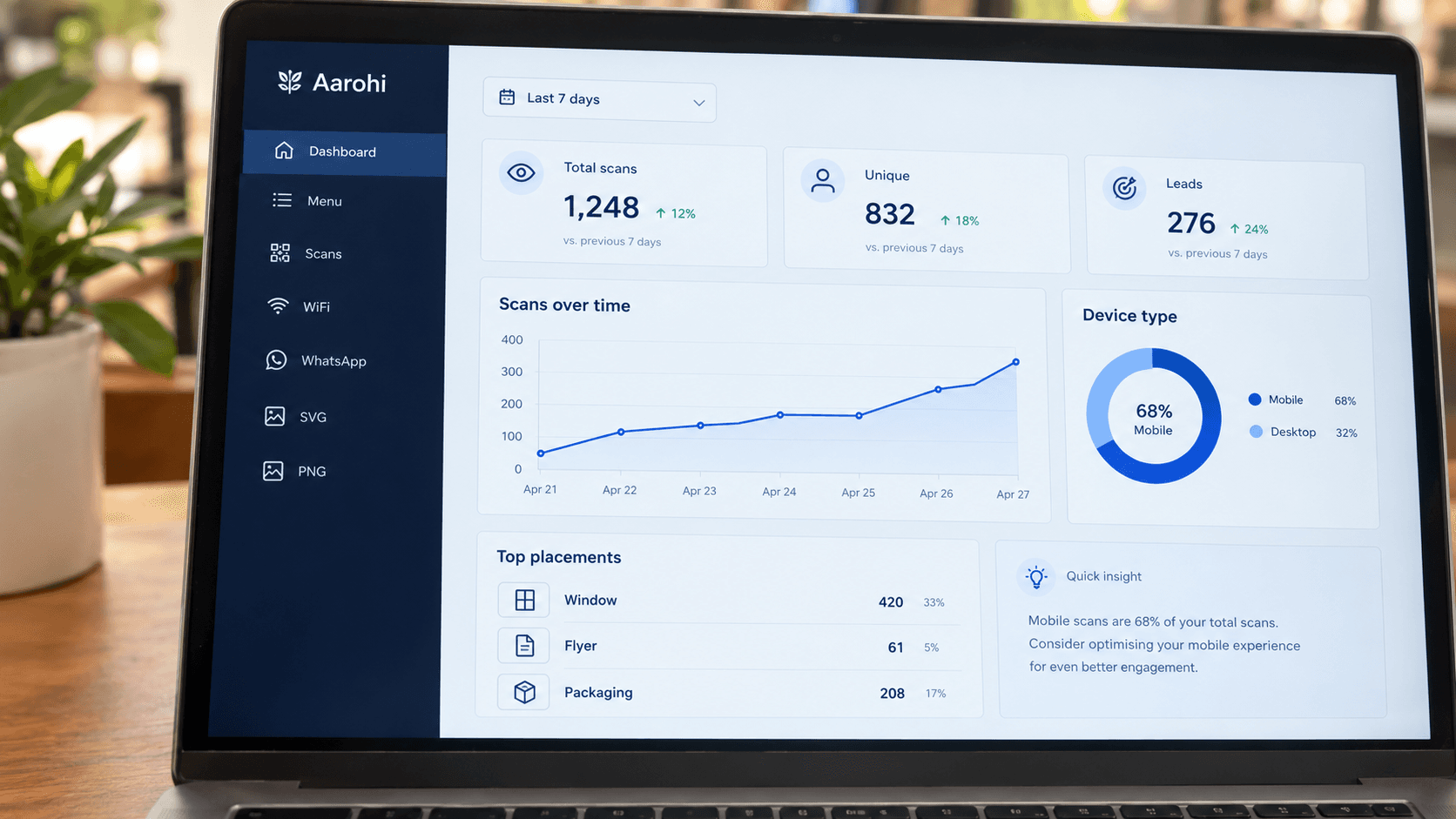
On QR Junction a scan stores: time, a visitor id in a cookie, device type, browser, OS, approximate city from IP, and UTM fields. Unique scans increment when we have not seen that cookie before. Total scans increment every time.
| Metric | What it means | What it does not mean |
|---|---|---|
| Total scans | How many times the short link was opened | Not orders, not footfall, not “people” |
| Unique scans | New visitor cookies | Not a legal identity; same person on two phones counts twice |
| Device / OS | Mobile vs desktop mix | Not which staff member tested the code |
| City / map | Where the IP looked like it was | Not a street address |
| Conversions / leads | Form submits or clicks you wired | Not automatic just because someone scanned |
Why static QR codes show up as Direct in GA4
A camera opening a bare URL looks like someone typed it. No referrer. No campaign. GA4 files it under Direct. If you did add UTMs but used a medium GA4 does not recognise, you get Unassigned, which is worse because you did the work and still lost the channel.
Print and packaging have no built-in GA4 channel. You have to invent one and stick to it. We default to utm_source=qr_junction, utm_medium=qr_scan, and utm_campaign as the QR name. Keep the casing identical. Email and email are two campaigns.
QR Junction can stamp those parameters on the way out. You can still add extra query params on the destination if your ads team has a house style. Just do not generate four static images with four UTM strings and then change the landing page — you will reprint.
One destination, many codes
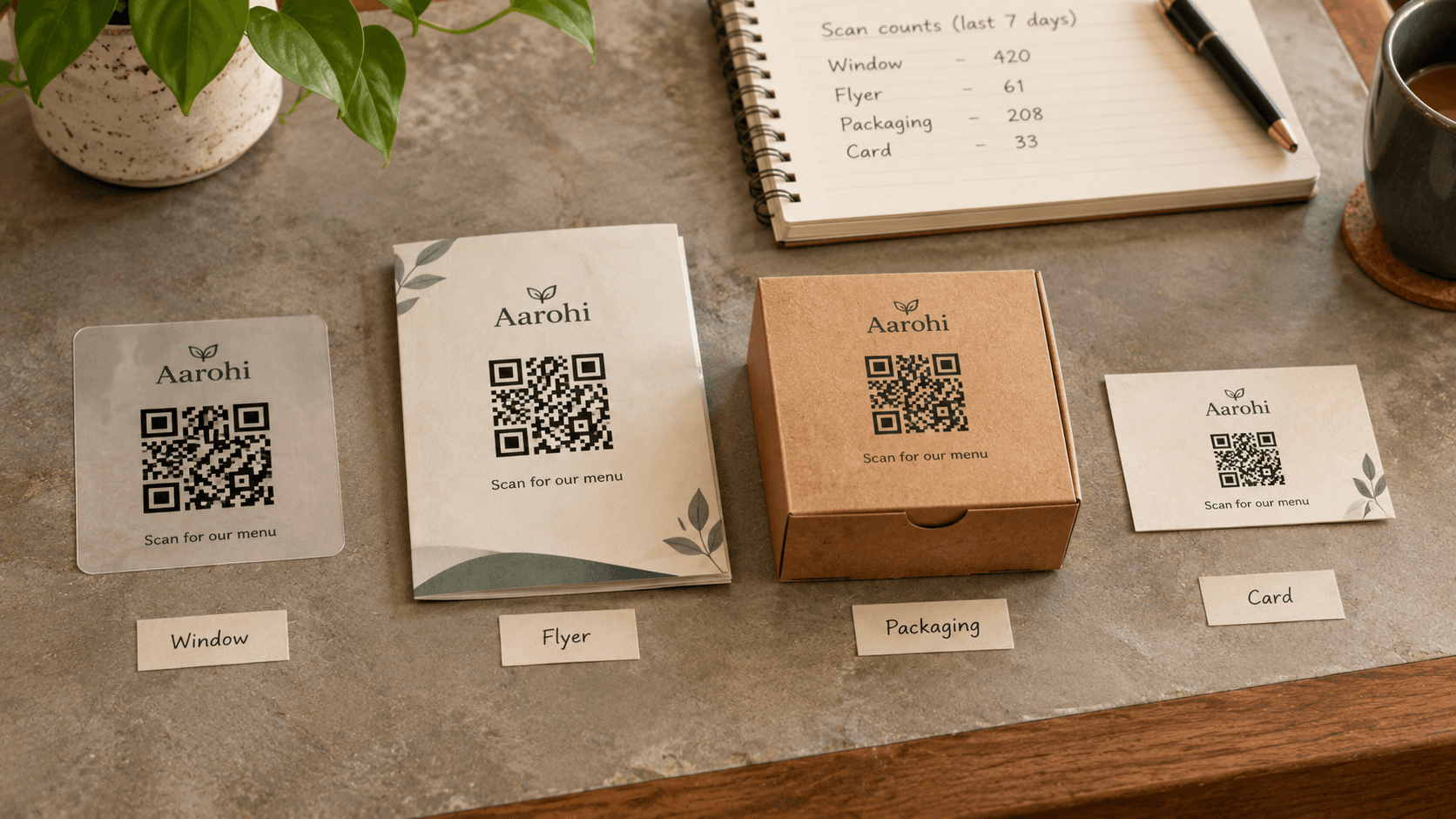
This is the only tactic that makes QR code tracking worth doing. Same offer page. Separate dynamic codes named Window, Flyer, Packaging, Visiting card.
After two weeks you will usually find one placement is theatre. The flyer nobody took home will sit at zero. The billing counter will carry the campaign. That is the report the Andheri salon did not have.
Unique vs total scans
Total scans go up when the same guest scans twice, when a waiter tests the tent, when you open the short link on your laptop. Unique scans try to count new cookies. Ours last a year. Clear cookies, new phone, or in-app browsers and you get another unique.
Do not present unique scans as “customers.” Present them as “distinct devices we have seen.” If a restaurant wants per-table honesty, give each table its own code. That is how the QR code menu setup avoids lumping the whole floor into one number.
Scans are not conversions
A scan means the short link loaded. A conversion is a later event you choose: WiFi lead form, landing-page email, a button click. If you never fire those events, your conversion rate is a decoration.
We log form submits and some clicks when you use hosted pages. Purchases, bookings, and call clicks only appear if you actually send them. Do not copy a dashboard screenshot into a pitch deck and call it revenue.
What you should tell people, briefly
You are not reading their photos. You are logging that a public link was opened, with coarse location from IP. If you collect a name on a form, that is a lead, and you treat it like any other form on a website.
Do not put tracking codes on things that should stay private — a personal WiFi password at home does not need analytics. A festival banner does.
A tracking setup that takes one afternoon
Register, create a dynamic QR for the campaign, fill UTM source/medium/campaign, duplicate the QR for each physical placement, download SVGs, print a test, scan from the real distance, then replace the old static squares.
If you already printed static codes, you cannot bolt analytics onto them. Generate new dynamic ones and swap the stickers. Painful once. Then you stop guessing.
- Name codes after the object, not the offer — “Mall-window-B2” beats “SummerSale”.
- Keep destinations identical so you are comparing placement, not two different pages.
- Look at the first seven days before you reprint 500 flyers.
- Staff test scans: do them from one known phone and ignore that spike, or use a paused code for internal tests.
If you cannot see the scan, the print is a hunch
QR code analytics will not tell you if the chai was good. They will tell you the poster near the lift was a waste of vinyl. That is usually enough to change what you print next month.
Start with dynamic codes. Split placements. Read unique versus total without pretending they are people. Then decide what to reprint.
Frequently asked questions
Can QR codes be tracked?
Dynamic ones can, because they open a short link you control. Static ones encode the final URL and leave no scan log. Details are in our static vs dynamic guide.
What is the difference between unique scans and total scans?
Total counts every open of the short link. Unique counts new visitor cookies. The same person scanning twice is two totals and usually one unique, unless they switched phones or cleared cookies.
Will QR code tracking show up in Google Analytics?
Yes if the destination URL carries UTMs that GA4 understands. Without UTMs, scans often land in Direct. Use a consistent utm_medium such as qr_scan.
Does tracking QR codes identify the person who scanned?
No. You get a cookie id, device, and approximate city. A name only appears if they submit a form after the scan.
How do I track which poster or table performed better?
Print a different dynamic QR for each placement, all pointing at the same page. Compare scan counts per code. One shared image cannot answer that.
Do I need a paid tool to track QR code scans?
You need a platform that owns the redirect. A PNG from a no-account generator will not grow a dashboard later. Create a dynamic QR if you plan to measure anything.
Related guides
Static vs Dynamic QR Codes: Which One Do You Actually Need?
They look identical on paper. One dies when the URL changes. The other you can edit — and count. Pick before you print 500 flyers.
Bitly vs QR TIGER vs a Dedicated Shop QR Tool
Bitly’s own comparison is two columns: link platform vs QR suite. Indian counters need a third column — WiFi, WhatsApp, menu, reviews. Figures from vendor pages on 26 Oct 2026.
QR Codes for Small Businesses: 10 Uses That Actually Work
You already have counters, bags, and walls. Ten ways to turn those into a review, a menu, a chat, a WiFi join, or a number you can trust — without a marketing team.
Create a dynamic QR and watch the scans
Create custom vector patterns, integrate dynamic redirection endpoints, and view details.